
Notes, Lists & Maps
Notes are how KinLife tracks everything that isn't a calendar event: shopping and packing lists, to-dos, meeting notes, restaurants to try, places to visit. Find them under Notes, or ask the assistant to make and update them for you.
Types of note
Five kinds you can create yourself:
- Note: free-form Markdown: headings, bullets, bold, italic, and links. Good for prose like meeting notes or weekend plans.
- List: checkbox or bullet list. Checkboxes render as real tappable tick-boxes. Use checkboxes for actionable lists (shopping, packing) and bullets for reference lists (books, gifts).
- Map: a set of pins on a Google Map, each with one-tap directions.
- Recipe: ingredients and steps. Recipes you keep from Saved Links land here too.
- Product review: a verdict, pros and cons, and where to buy it.
You'll also see Todo lists: the checklist on a todo, made when you add items to one in Todos.
Creating notes
Two ways:
- In the Notes view: create directly and edit with the Markdown editor.
- By asking: “make a packing list for the camping trip” and the assistant builds it. It can also append items and tick things off across conversations.
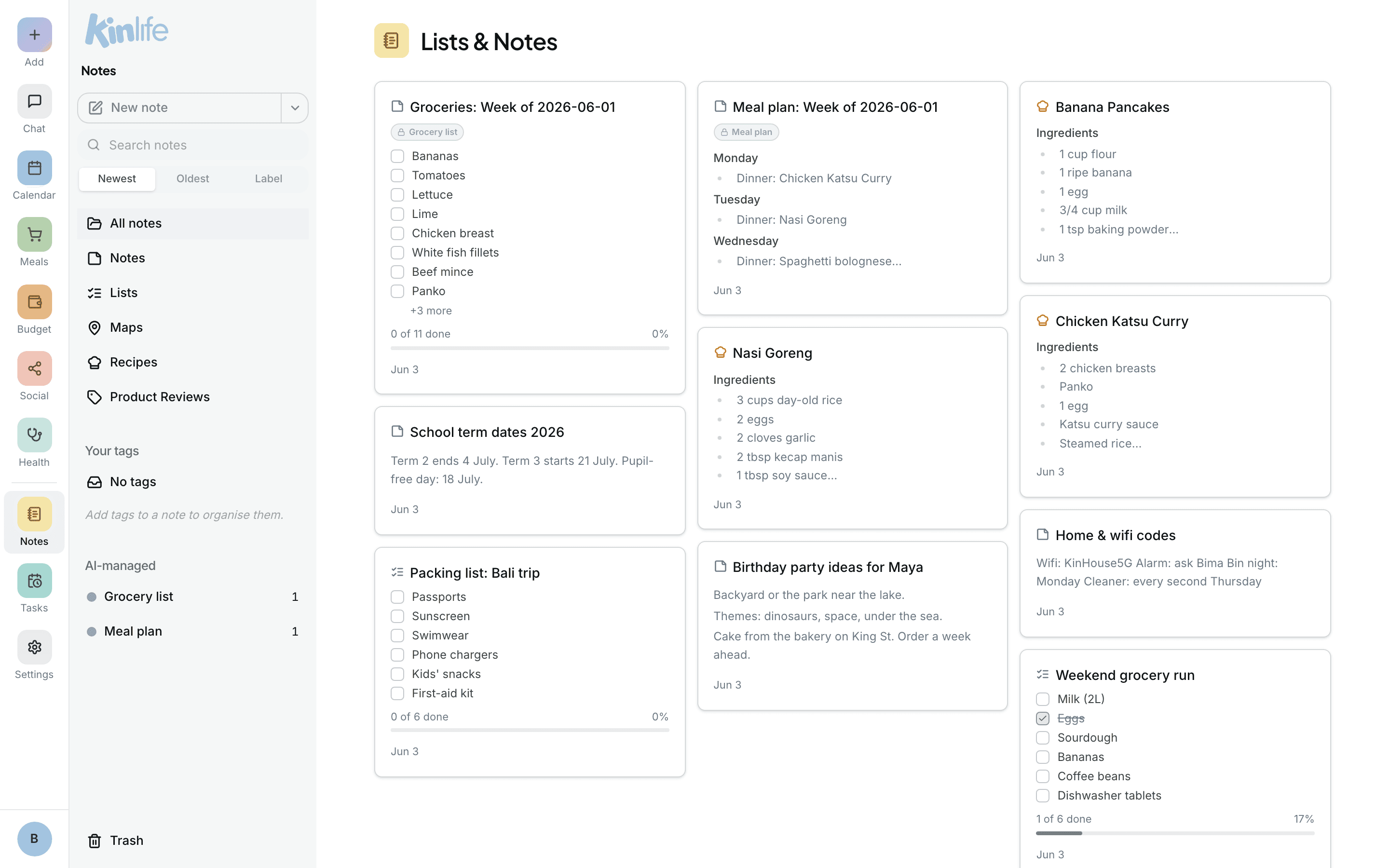
The Notes view is a masonry grid in the style of Google Keep, with full-text search and lazy loading. On a phone, the same filters sit in the menu you open from the header.
Checkbox lists
Lists support - [ ] and - [x] Markdown, which render as tick-boxes anyone in the family can check off directly, without typing. If two people edit the same note at once, KinLife detects the clash and warns you rather than silently overwriting one person's changes.
Map notes
A map note is a curated set of locations. Each pin has Google Maps and Directions links, plus a per-pin note (the dish to try, who recommended it, the hours).
- Add pins manually with Google Places autocomplete in the editor.
- Or just ask: “save these Tokyo restaurants to a map” and KinLife geocodes each place and pins it.
Linking notes to events
Any note can be attached to a calendar event, e.g. a packing list on the camping trip. The link shows up in two places: the event's detail dialog in KinLife (clickable), and the Google Calendar event description (as a deep-link), which opens the note for anyone in your family who is signed in to KinLife. See Calendar.
Tags & organisation
The sidebar splits Your tags (the ones you create, sorted by count) from AI-managed tags like Meal plan, Grocery list, Restaurants, Travel Wishlist, News & Interests, and Shopping Wishlist. Each tag shows a note count and is clickable to filter.
Trash & restore
Deleting a note moves it to Trash (pinned to the sidebar footer), not gone for good. Restore it with one click. Notes are only removed permanently when you explicitly purge them, and that deletes their photos and recordings too.